Resource planning for universities
Every booking fits. No double bookings.
Courses, events, rooms, equipment, teachers and student groups in one shared plan. Tangram checks each booking against all the others the moment it is made, so a group is never expected in two places at once.
2 conflicts: this cannot be saved
Fri 14:00 Lecture hall A is already booked for “Open day” (14:00 to 17:00).
Fri 14:00 Projector 1 is already booked for “Open day”.
- 0.1 s
- to check a full-semester series against every other booking
- 5
- kinds of resources checked: rooms, equipment, teachers, staff, groups
- FR · EN
- interface and emails, chosen by each user
The problem
Three planners, three tools, one group of students
Different people plan different resources. When each works in their own spreadsheet, nobody sees the whole picture, and clashes are found by the students standing in the corridor.
Timetable planner
Courses for every program · Excel workbook
Event organiser
Open days, workshops, visits · Shared calendar
Facilities team
Rooms, projectors, TVs · Emails and a list
Thursday, 10:00
Course
Networks
Bachelor Informatik L2 · Room B-102
Event
Company visit
Bachelor Informatik L2 · Lobby
Both were planned. The teacher prepared a lecture, the organiser booked a bus. Half the class turned up to each.
The Tangram way
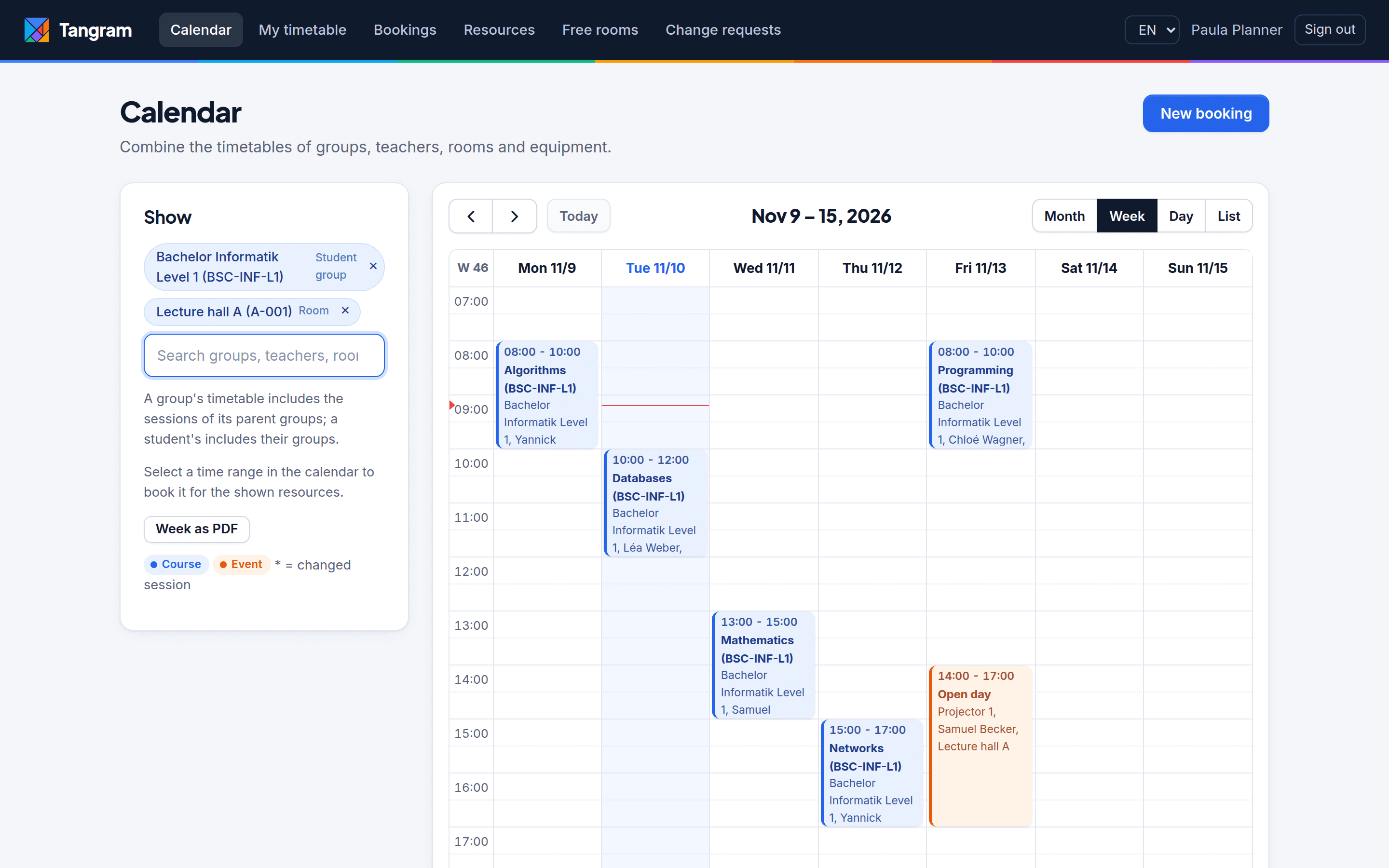
Every planned activity is a booking of resources over a time slot, all in one place.
Because everything lives together, the clash is caught while the second person is planning, with the name of the booking it collides with and who to contact. Not after the fact, and not by a student.
How it works
From spreadsheets to one clash-free plan in three steps
01
Bring your data in
Import programs, rooms, people, groups and memberships from CSV or Excel. You see a preview and a clear error report before anything is saved. Then set semesters, holidays and closure days.
- Groups with sub-groups (Lab A, Lab B)
- Students in several groups
- New resource types without code
02
Plan with a safety net
Create courses and events, one-off or recurring. While you fill in the form, Tangram checks every session against every other booking and tells you exactly what clashes.
- Weekly, every two weeks, several weekdays
- Holidays and closures skipped automatically
- Move or cancel a single session
03
Everyone sees the same plan
Students and teachers get a personal timetable, planners combine any groups, rooms and teachers in one calendar, and changes are emailed to everyone involved.
- iCal links for Outlook, Google and phones
- Weekly timetable as PDF
- Friday email with next week’s timetable
A clash is stopped before it is saved
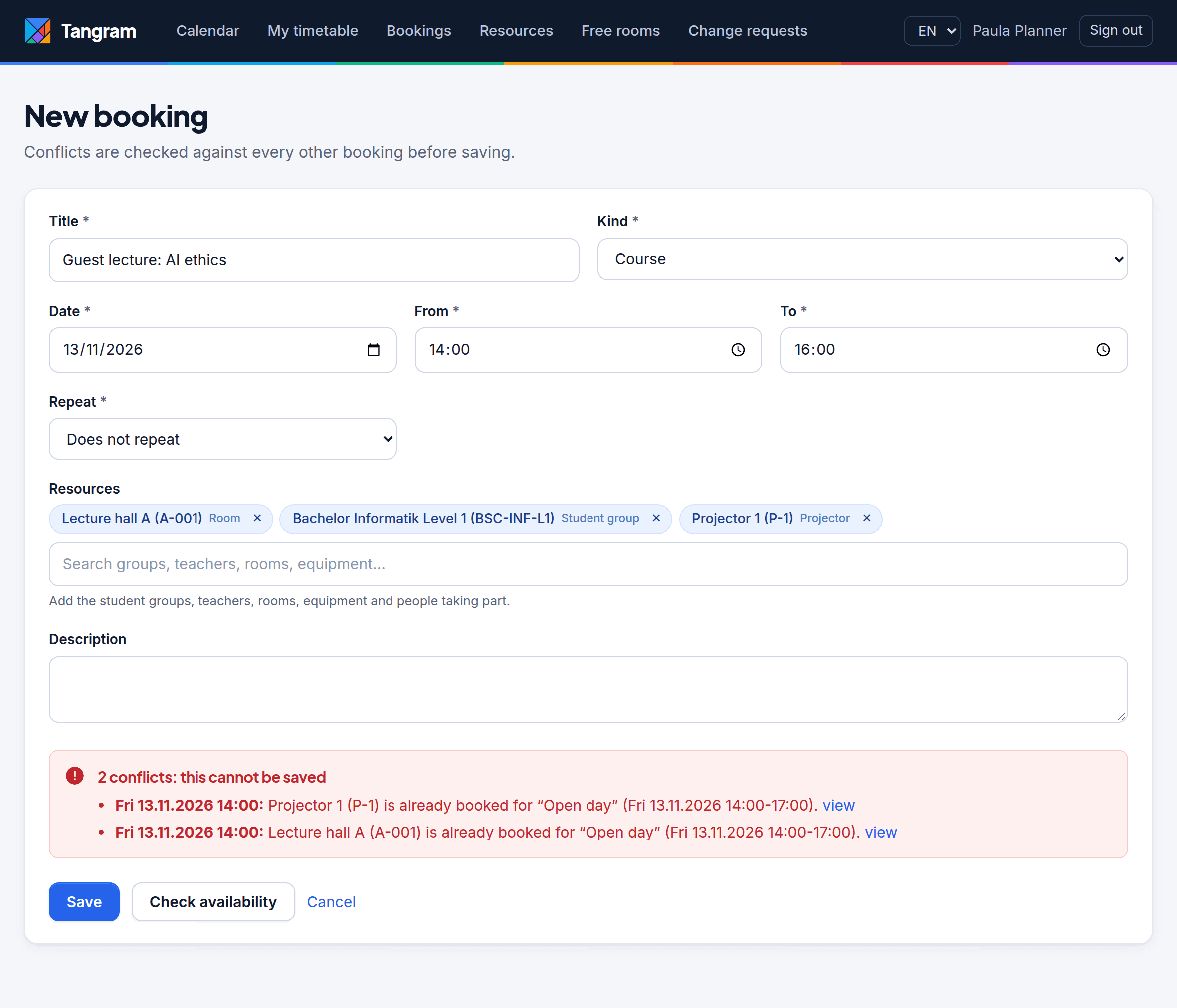
The planner adds a room, a group and a projector. Tangram answers immediately: the hall and the projector are already used by the “Open day”. Each message names the booking, its time and links to it, so the planner knows who to talk to.
For a recurring course, it lists exactly which sessions collide, so you can move or skip just those.
Try it
Find a slot for a 2-hour guest lecture
It needs Bachelor Informatik Level 1 and Lecture hall A. Click anywhere in the week: Tangram checks the group, the hall, and every group that shares students with it.
New booking
Guest lecture: AI ethics
Fri · 14:00 to 16:00
1 conflict: this cannot be saved
- Fri 14:00: Lecture hall A is already booked for “Open day” (14:00 to 17:00).
In the real app this runs on every change to the form, for every session of a recurring series, and the database itself makes sure two planners saving at the same second cannot both win.
The rules
Hard clashes are refused. Judgement calls need a reason.
Some conflicts must never happen. Others are sometimes fine, as long as someone says why. Tangram knows the difference.
The booking cannot be saved
- The same room, equipment, teacher or staff member in two overlapping bookings
- The same student group in two overlapping bookings
- Two groups that share at least one student, e.g. “Bachelor Informatik L1” and “French B1”
- A group and its own sub-group or parent group at the same time
Allowed with a written reason, kept on the booking
- The room has fewer seats than the number of participants
- A resource is marked unavailable (teacher not on Fridays, room under maintenance)
- A student is invited to an event while one of their groups has a course
- A one-off booking falls on a holiday or closure day
Product tour
This is what it looks like
Real screens from Tangram with its demo data. No mock-ups.
See any mix of groups, rooms, teachers and equipment
Pick resources and their timetables appear together, by day, week, month or as a list. Select a free range to book it for exactly those resources. Export the week as PDF in one click.
For everyone involved
Each person gets what they need, from the same data
Timetable planners
Plan courses for every program with recurring series that respect the academic calendar. Approve or reject teachers’ change requests; approved changes are checked like any other.
Event organisers
Book halls, projectors, groups and individual people for open days and workshops, and see at once whether students already have a course.
Teachers
See their own week and any timetable they need. Ask for a course to be moved, cancelled or given another room, and get the decision by email.
Students
One timetable with all their groups and invitations, on any phone, in their calendar app and in their inbox every Friday. Read only.
Administrators
Define roles with rights per booking kind and per resource type, import data, manage the calendar, and read the full audit log.
Instant conflict detection
Rooms, equipment, teachers, staff and groups, including groups that share students.
Recurring bookings
Weekly, every two weeks or several weekdays, skipping holidays and closures.
Change one session
Move, change or cancel a single occurrence without breaking the series.
Calendar subscriptions
iCal links for Outlook, Google Calendar and phones, always up to date.
PDF timetables
Print or send the week of any group, room or teacher.
Email notifications
Everyone involved is told when a booking changes, in their language.
CSV and Excel import
With a preview and an error report before anything is saved.
Full history
Who changed what and when, for every booking. Accepted warnings keep their reason.
For your IT department
Easy to run, hard to break
Built on Django and PostgreSQL, with no exotic dependencies and no separate job server to operate.
Your servers or ours
Runs with Docker Compose on a single server, or as a hosted service. Static assets are bundled, so it works on a closed campus network.
Consistent by design
PostgreSQL range types and exclusion constraints guarantee that two people booking the same resource at the same moment cannot both succeed.
Privacy first
Student data is personal data. Students only see their own timetable, access is role-based, and the audit log is for administrators only.
Fast at university scale
Tested with 7,700 sessions and 3,000 people: a semester series is checked in under 0.1 s and calendar pages load in under a quarter of a second.
Bilingual
The whole interface and every email in French and English, chosen by each user. Room and group names can be translated too.
Open source
Licensed AGPL-3.0. Read the code, audit it, and never be locked in: your data stays in a standard PostgreSQL database.
Plans
Run it yourself, or let us run it for you
The same software in every plan. You choose who takes care of it.
Self-hosted
For institutions with their own IT team.
Free
Open source, AGPL-3.0
- Every feature
- Docker installation guide
Hosted
We run Tangram for you, with nothing to install.
On request
Priced by number of students
- Everything in Self-hosted
- Hosting, backups and updates
- Email support
- Help importing your data
Institution
For universities with several campuses or custom needs.
On request
Annual agreement
- Everything in Hosted
- Onboarding for your planners
- Priority support
- Roadmap input
FAQ
Questions planners and IT ask us
Does Tangram generate the timetable for us?
No. Your planners stay in charge of the plan; Tangram makes sure what they plan is possible. It checks every booking against all the others and refuses the ones that clash.
What happens if two planners book the same room at the same second?
Only one of them succeeds. The guarantee is enforced by the database itself, not just by the form, so there is no race to lose.
How do we get our existing data in?
Import programs, rooms, people, groups and group memberships from CSV or Excel files. Each import shows a preview and lists any errors before anything is saved. Example files are included.
Can students and teachers use their own calendar app?
Yes. Each person gets a private subscription link that works in Outlook, Google Calendar and on phones, and it updates automatically when a booking changes.
Which languages are supported?
French and English, for the interface and for every email. Each user chooses their own language.
Can we sign in with our university account (SSO)?
Today Tangram uses email and password, with sign-in rate limits. It is built so that university single sign-on (LDAP, SAML, OIDC) can be added; talk to us if you need it.
Where is our data stored?
Self-hosted, it stays on your own servers. In the hosted plan, we agree on the hosting location with you. Either way, it lives in a standard PostgreSQL database you can export at any time.
Make every piece of your timetable fit
See Tangram with your own programs and rooms. A 30-minute call is enough to know whether it fits your institution.